
Agents that work – not just answer.
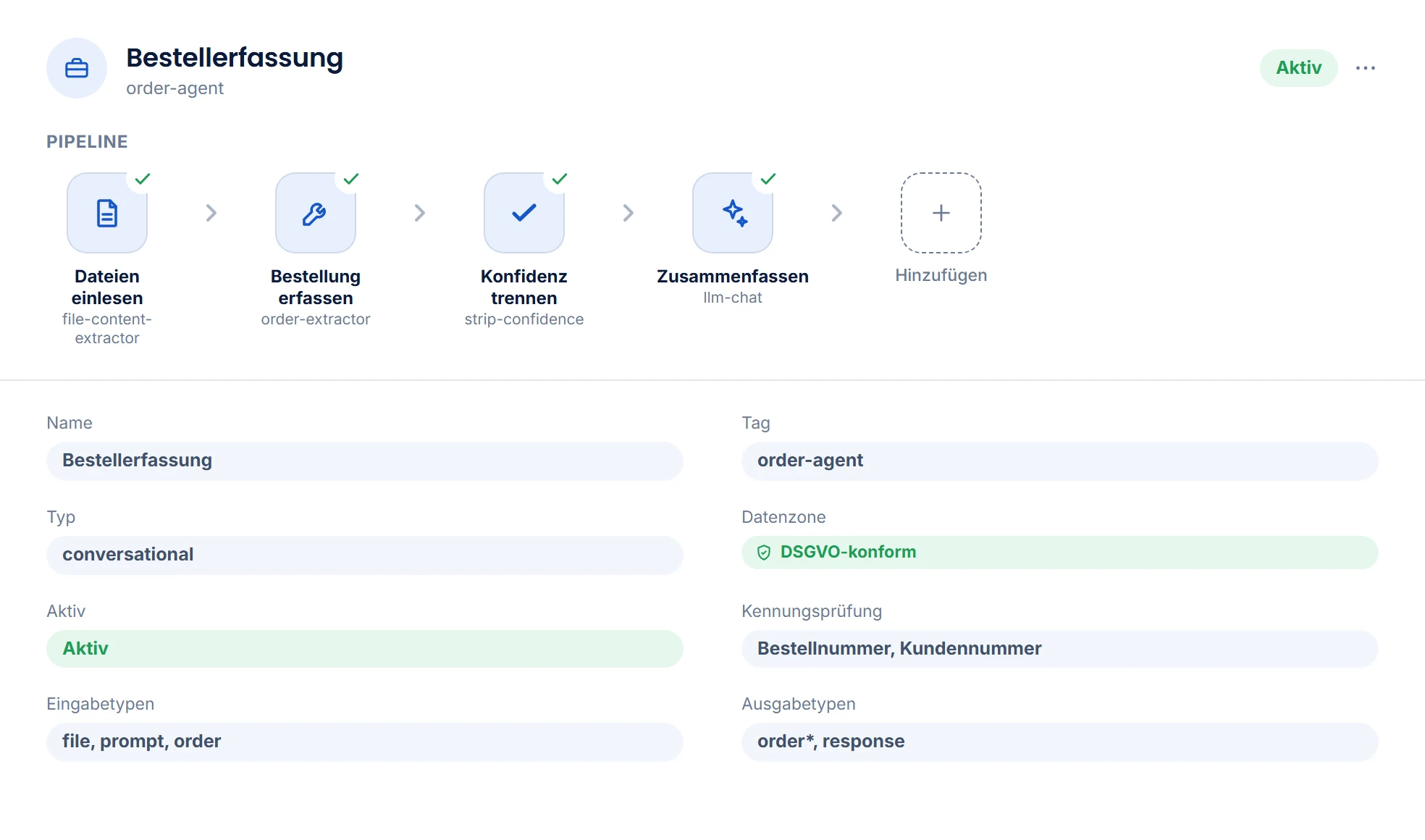
In MadeForPrivacy, an agent is not a prompt in a chat window but a pipeline of tools: defined steps, structured inputs and outputs, a data zone, clear permissions. Supplied ready to use and adapted to your workflows – or built by you.
In brief
An agent, not a chatbot: how it works.
Video transcript
Hello, I'm Neva, your personal assistant. You ask me, and I bring in the right agent.
An agent is not a prompt in a chat window but a pipeline of steps. Each step is a tool with a fixed input and output type: reading a document, extracting values, querying the database, sending an email or asking a model.
Between the steps, the briefcase travels along with files, fields and metadata. So it's always clear where a value comes from. And conditions are checked along the way: the invoice agent books nothing without a valid invoice number.
There are ready-made agents for orders, invoices, emails and translations, for example. Together, we adapt prompts, tools and data zone to your workflows.
You don't need to know the agents. I take care of that.
What an agent is
Three things turn a prompt into a process.
Every agent has an identity, a data zone and a pipeline. The pipeline is an ordered list of tool steps – and these steps don't exchange loose variables but items in the briefcase.
Steps & tools
Each step is a tool call with a defined input and output type. Read a document, extract values, query a database, send an email, ask a model – in the order you define.
document-processorllm-extractdatabaseapimail-sendBriefcase
The container that travels through the pipeline: files, fields, metadata. Each step reads from it and writes to it – so it's always clear where a value comes from and where it goes.
filedocumentorderresponseConditions & validation
Steps only run if their condition is met; outputs can be validated against a schema. An agent that books invoices books nothing without a valid invoice number.
execution_conditionsjson_templateReady-made agents
The starting point is ready. The fine-tuning is up to you.
In the client, you choose agents by category or search – or simply describe the task. Ready-made agents cover typical work; together, we adapt prompts, tools and data zone to your workflows.
- 📦Order processing
- 🧾Invoice agent
- 📧Mail agent
- 🌐Translation
- 📄Document creator
- 📚Knowledge agent
- 🔧IT support
- 📊Datasheet agent
- 🧠Sparring partner
The document creator delivers finished Word, Excel, PowerPoint or PDF files on your letterhead – with calculated figures instead of placeholders.
One entry point for everything
Neva knows your agents – you don't have to.
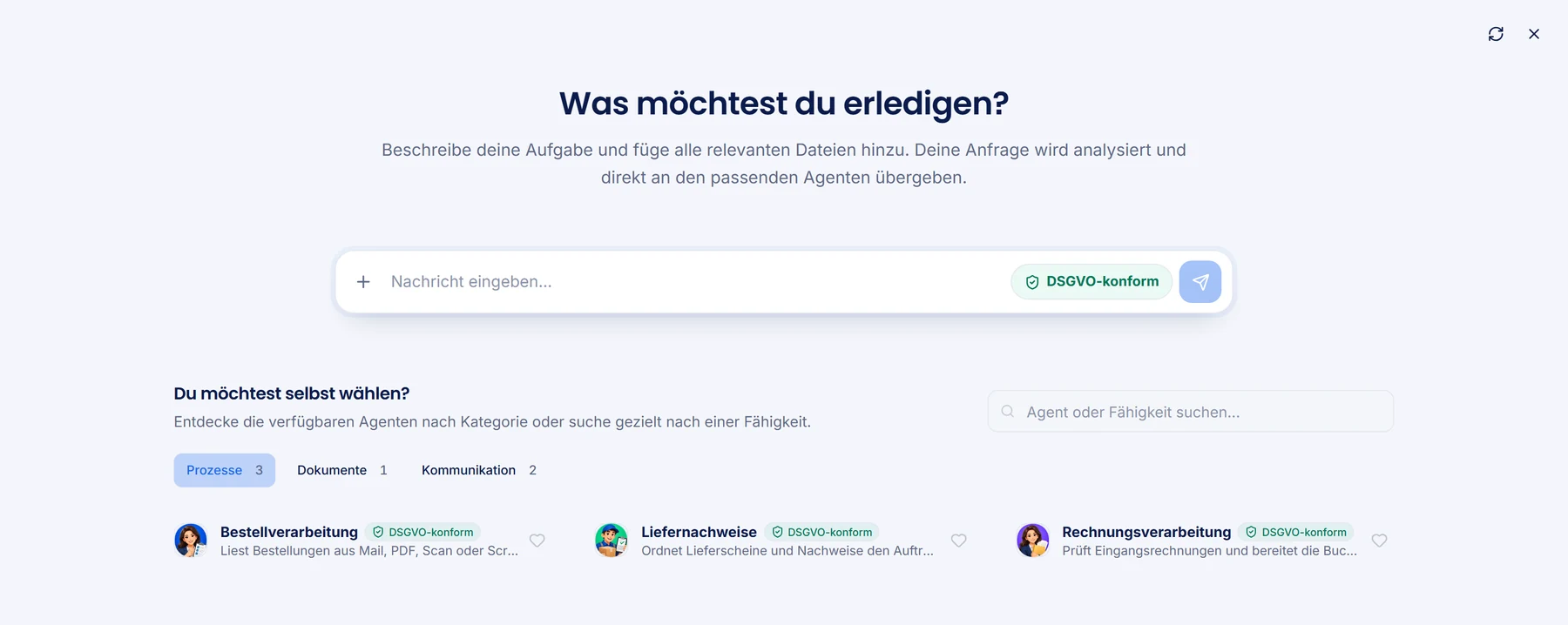
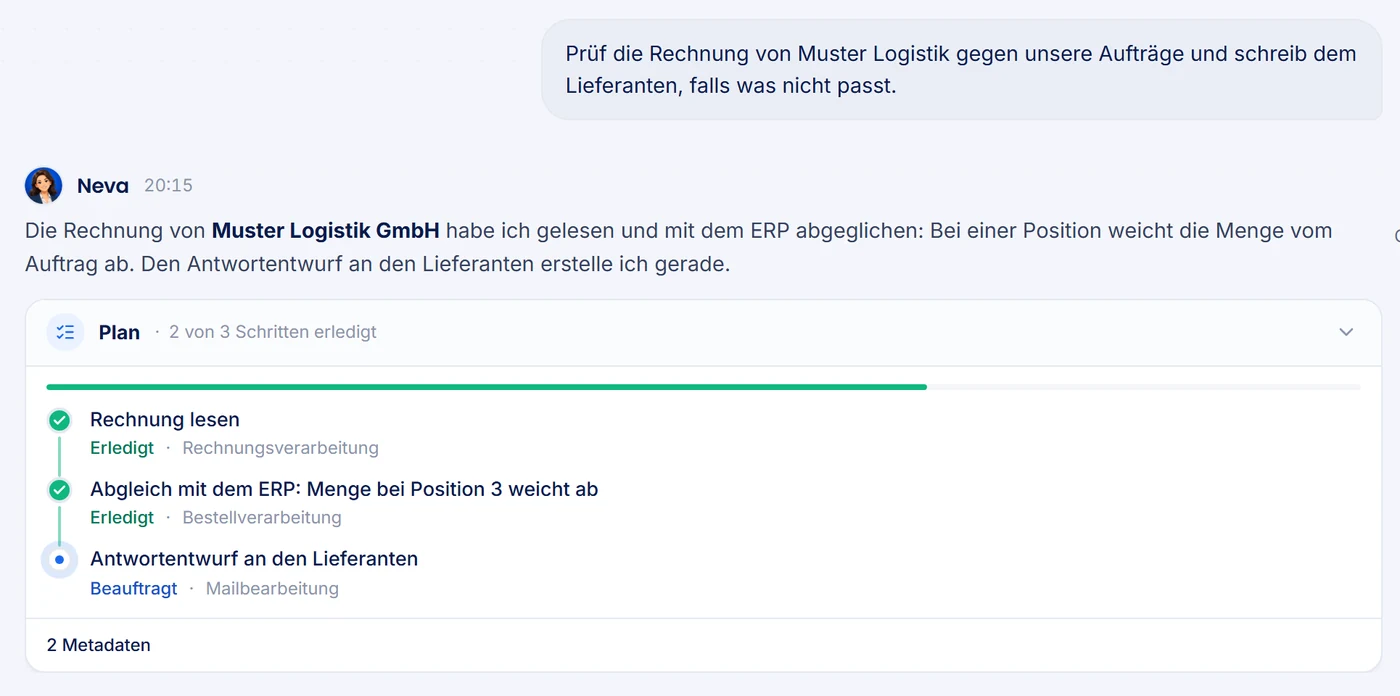
The personal assistant answers herself when she can and hands specialist tasks to the right agent. If you know the task but not the agent, use dynamic agent selection.
Neva answers, remembers, delegates
She answers questions from the conversation, retrieves stored knowledge, remembers what matters to you – kept separate for each person – and has the mail agent reply about an invoice instead of trying it herself.
She keeps an eye on signals
Agents can send signals: a new invoice, a reply from a customer, an order in the system. Neva checks them against your rules – locally, without a model call – and only gets back to you when something matches.
Dynamic selection with +
Describe the task, attach files, done: a selector picks the right specialist from the agents you're allowed to use. You set the data zone with the badge next to it.
Workers: agents without a chat
Scheduled workers regularly check for new entries – tickets, orders, mailboxes – and start the right agent as a job for each one. Item runs prevent duplicate work.
Costs under control
The AI is called when it's needed. Not all the time.
Many AI tools let a model decide in loops what to do next – and every detour costs tokens. Here, the pipeline controls the flow; the model gets only the step and the context it needs.
Model per step
Simple steps run on low-cost or local models, demanding ones where it pays off – set per tool or step, not per agent.
Enhanced mode
Expensive models or alternative pipelines are restricted to approved groups. Authorized users switch them on per run with the lightning icon. The agent's data zone also applies in enhanced mode.
Cost down to the cent
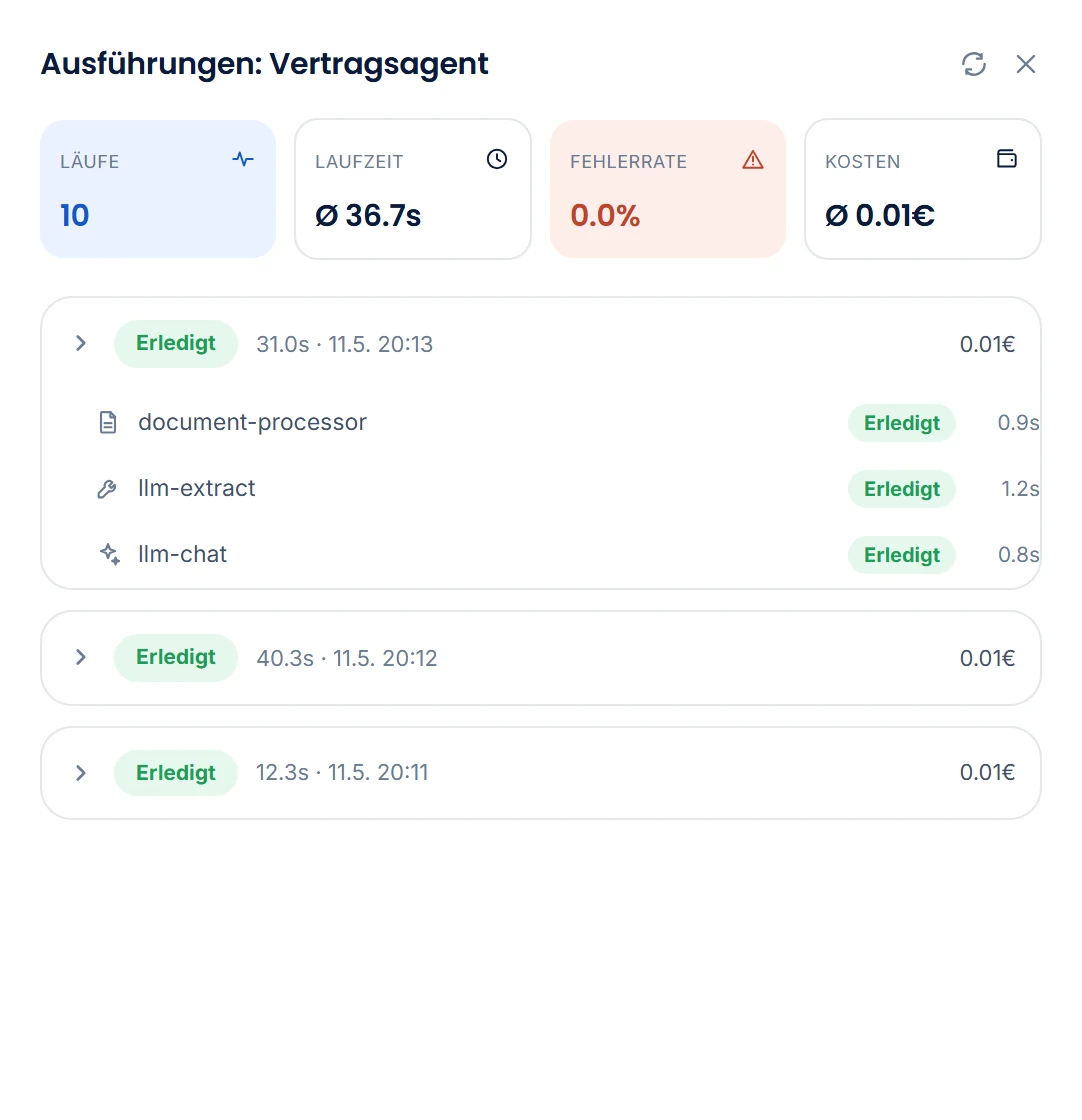
Every model call is recorded with prompt and response tokens at the configured rates – per run, per agent, over time.
Tracker per run
Which step ran for how long, which items it received and delivered, which model it used, what it cost. Optimization based on numbers, not gut feeling.
Automation
Agents that get to work on their own.
Not every task starts with a question in the chat. Workers are scheduled scouts: on a schedule, they check the ticket system, mailbox or order list, detect new or changed entries and start the right agent for each one – as a job in the queue, with the same data zones, permissions and tracker as a run started from the client.
Schedule
A cron expression determines when the worker checks – every five minutes, hourly, every night.
cronDiscover
A small pipeline of its own fetches the candidates: open tickets, unread emails, new orders – via the API, mail or SQL tool.
discoveryMatch
Every entry has an external ID and, optionally, a status. New or changed? Then it gets a job – otherwise not. A limit per run prevents floods.
item-runRun
For every match, the configured agent runs under a defined service account. Result, cost and errors appear in the tracker, just like any other run.
jobExample: A worker checks the support mailbox every ten minutes. For every new email, it starts the support agent, which classifies the request, pulls context from Knowledge and writes a draft reply into the ticket. Nobody has to trigger the agent – and every run is traceable on its own.
Meeting minutes: A worker fetches meetings from Zoom (other providers can be connected). The agent turns them into a summary, tasks, deadlines and a cleaned-up transcript and emails them to the organizer. This is included in the platform, not an add-on module.
Adapt and build
In the client, without code.
Refine a prompt, swap a tool, change the data zone, give a group access: changes take effect immediately. You build new agents from the same building blocks – and the tracker shows whether they do what they should.
- Start with the helpDescribe the task, the help proposes an importable configuration – you see and change the pipeline, steps, services and zone before importing.
- Assemble the pipelinePut tools in order; input and output types match automatically or show you where something doesn't fit.
- Prompts per stepSeparate system, base and format prompts – plus placeholders that insert values from the briefcase.
- Data zone and permissionsChoose the zone, add AD groups, make the agent visible in the selection. The result: an agent that only the right people can see.
- Go live, monitor, refineEvery run shows up in the tracker. If something isn't right, you change the step – and the next run uses it.
Script tool
Where no tool fits, the AI writes the code.
Many steps of a process follow fixed rules and need no model: merging line items from two tables, totalling per tax rate, checking required fields, converting date formats. For these, the script tool runs TypeScript as a step of the pipeline, and the AI writes the code. That way the AI builds and extends agents itself, even when there is no dedicated tool for a step.
// Totals per tax rate from the invoice linesexport function process(items: Item[], ctx: Ctx) { const sums = new Map(); for (const line of items) { const rate = line.data.tax_rate; const sum = sums.get(rate) ?? mfp.decimal(0); sums.set(rate, sum.plus(line.data.net)); } return [...sums].map(([rate, net]) => ctx.item("tax_summary", { rate, net: net.toFixed(2) })); }
- Same data, same resultThe script step computes without a model call and costs no tokens. It calculates amounts with exact decimal numbers, so totals are correct to the cent.
- Code in the step or from the runThe code is fixed in the step. Or a model step before it writes the code during the run, and the script tool executes it.
- Sealed offThe script sees only the items of its own step. Network, files, environment variables, credentials and other tools are blocked; run time and memory are limited. The server checks every result before it becomes an item.
- Described for AI toolsThrough the AI interface (MCP), a tool like Claude Code receives the complete interface of the script tool and can build missing steps directly as scripts.
Frequently asked questions
Quick answers.
Can I use AI to create agents?
Yes, in two ways. The built-in help in MadeForPrivacy describes the right agent for you and proposes an editable configuration that you review and import; a pasted agent starts disabled until you enable it. Or you work with an external AI tool such as Claude Code or Codex via the additional module AI interface (MCP).
What does the script tool do?
It runs code as a step of an agent: TypeScript that restructures items, checks values and calculates. The AI or your admin writes the code. It is fixed in the step or comes from a model step earlier in the same run. The script has no access to the network, files or credentials, and the server checks its result before it becomes an item.
Live demo
Which agent would come first for you?
Bring a real case – an invoice, an order, a mailbox. We'll show you live how the right agent handles it.