
A chat for your people. An operating system for your AI.
MadeForPrivacy runs as a Docker stack on your infrastructure. Agents work as tool pipelines, every agent runs in a data zone, every run is traceable – and your systems are connected directly instead of via copy & paste.
How a request is processed
From the click in the client to a traceable result.
Not a chat window that queries some model somewhere: every request is a job that runs through a defined pipeline. So afterwards it is clear what ran, where the data went and what it cost.
Request in the client
You choose an agent, write your question and attach files – or Neva delegates to the right specialist.
prompt + fileA job, not an ad-hoc call
The core creates a persistent job. A worker picks it up, with prioritization, cancellation and restart.
job-schedulerPipeline with briefcase
Tools run step by step and pass on structured items – documents, fields, validations. No step sees more than it needs.
document → extract → chatAn AI service that matches the zone
A step only uses services that meet at least the data zone of its agent. Local stays local – technically enforced.
local → dsgvo → unprotectedResult + tracking
The answer appears live in the conversation. The tracker shows steps, tokens, cost and errors for every run.
€0.01 · 3 steps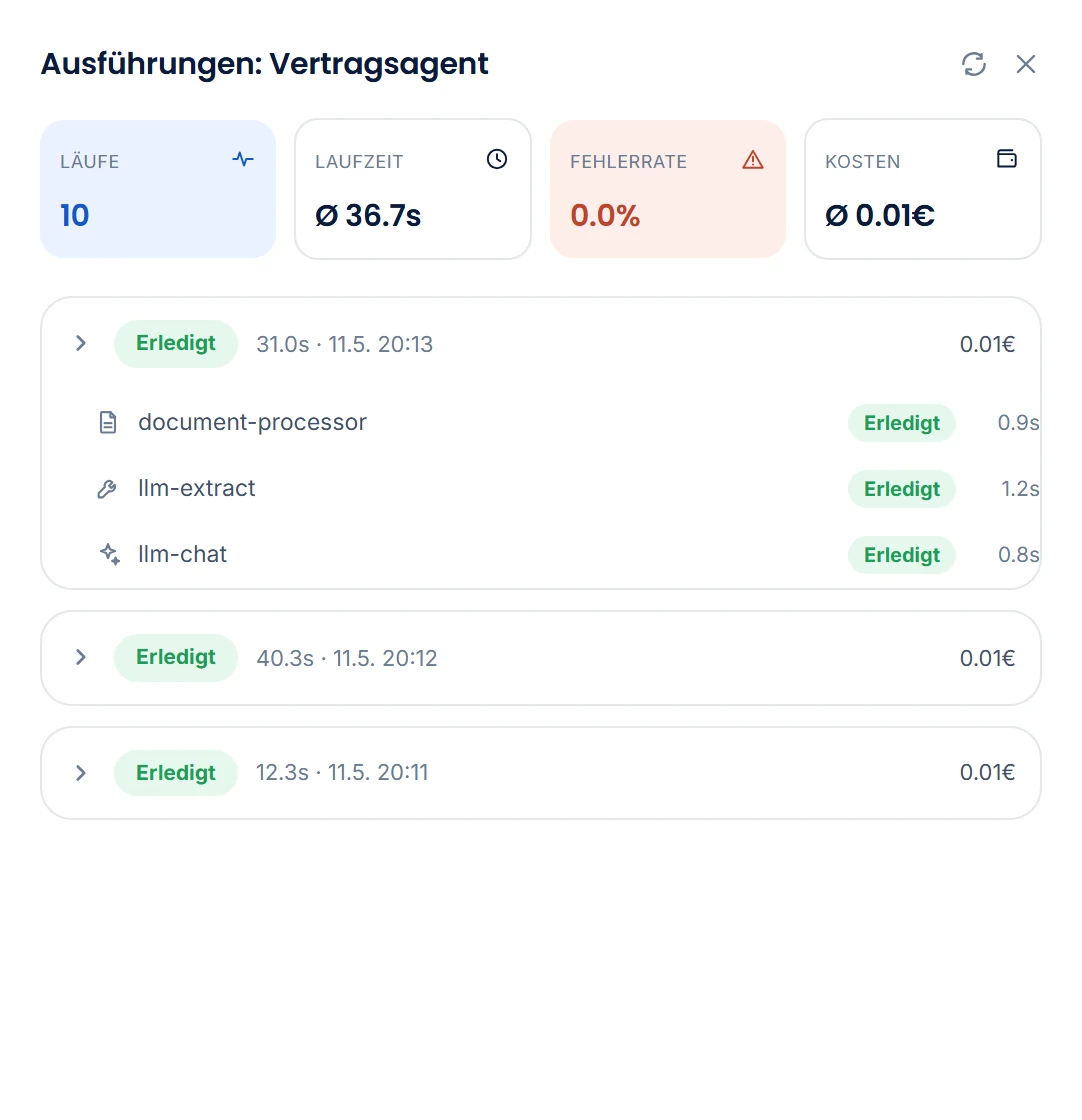
The building blocks
Everything you need to run AI in production – in one platform.
Each building block has its own page with details. Together, they form the system that runs agents securely, traceably and cost-effectively.
Data protection & data zones
Three zones define which data may go where. Agents, tools and AI services each carry a zone – the platform checks every combination.
Data protection →Agents & pipelines
Ready-made agents for invoices, orders, emails and support. Each one is a tool pipeline that you can adapt or build from scratch in the client.
Agents →Neva, the personal assistant
One entry point for everything: Neva understands your request, delegates to specialists and remembers what matters to you – kept separate for each person.
More on the agents pageKnowledge & memory
RAGFlow makes file shares and documents searchable – with source citations. Datasets are tied to AD groups, Neva's memory to the individual person.
Knowledge →Integration
API and SQL tools, file interfaces, Microsoft 365, email: agents work directly in your systems, not alongside them.
Integration →Client
Desktop app and browser. Drag & drop files, results as structured items, settings and operations in the same window.
Client →Handbooks
Git-backed, versioned document collections with read and write permissions per group – for quality management, processes and personal notes that agents read and maintain.
Handbooks →Automation
Scheduled workers pick up new entries (tickets, orders, emails) and start agents automatically – no chat required.
Automation →Operations & security
Built for IT teams who want to sleep at night.
One Docker stack, clearly separated services, secrets in Vault, encrypted communication and a status view that tells you what’s going on – before anyone calls.
Docker Compose
Core, database, cache, relay storage, RAGFlow, reverse proxy: everything runs in containers, updates via image tag. GPU variant for local models.
Vault for secrets
Passwords and API keys never appear in configuration files. Fields hold a reference; HashiCorp Vault supplies the value at runtime.
Encrypted between services
An internal certificate authority (Vault PKI) issues the certificates; services communicate via mTLS. Large payloads travel encrypted via the item relay.
Your directory, your groups
Sign-in via LDAP, Active Directory with Kerberos SSO, or OAuth (e.g. Entra ID). Access to agents, Knowledge and Handbooks is granted via AD groups.
Backup & restore
Configuration, data, licenses and Vault entries as an encrypted backup – for migration and disaster recovery.
Status, usage, logs
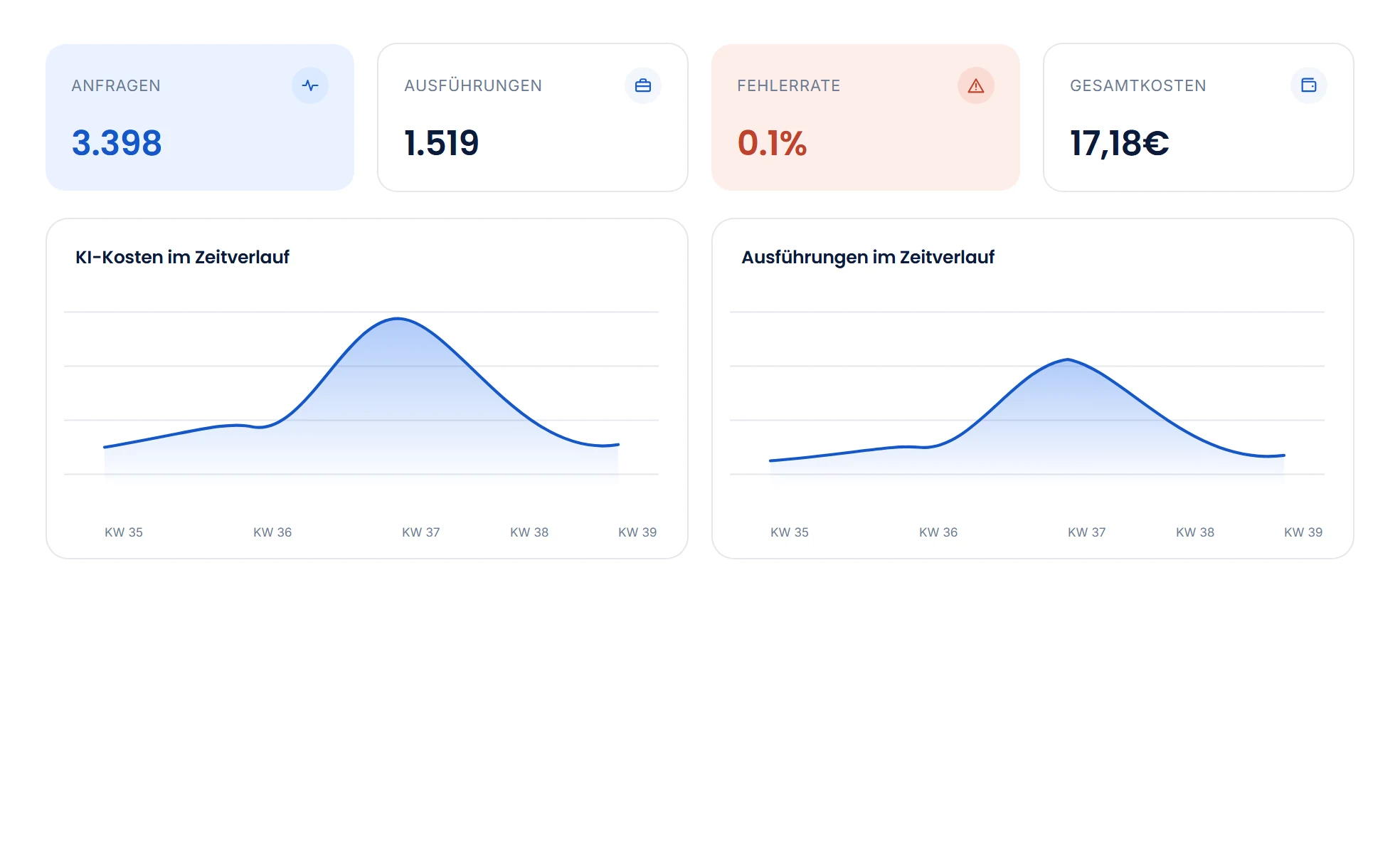
Component health and recent errors at a glance; requests, tokens and cost over time; change history and audit logs for compliance evidence.
Cost control
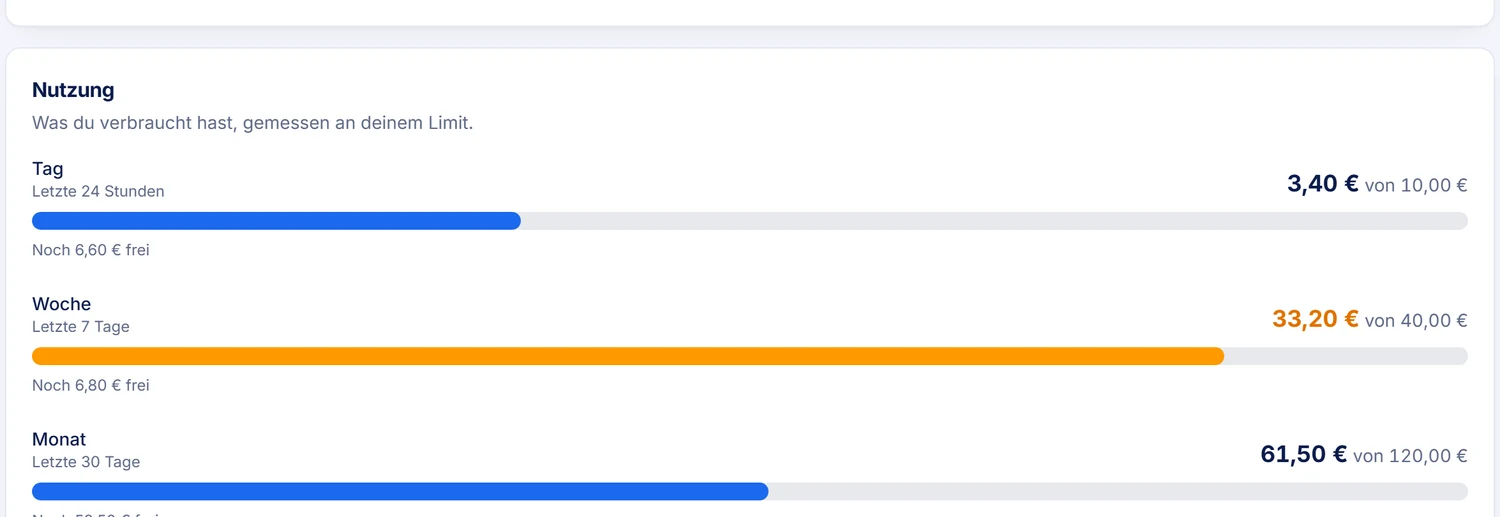
Limits per group.
Admins set limits in euros per group for the day, the working week and the month. If someone belongs to several groups, the lowest limit applies for each period. In the client, everyone sees their usage as a bar per period; it turns yellow at 80% and red when the limit is reached.
Infrastructure
Runs where your data belongs.
The platform is always self-hosted – on your servers or in your own cloud. The data zone, not the provider, decides which AI services it may use.
Fully on-premises
Local onlyFor environments where nothing leaves the network: your own GPU, local models via Ollama, all services on-premises.
- No external AI service needed
- Air-gapped operation possible
- Ideal for contracts, HR and internal matters
Your own cloud
GDPR-compliantThe stack runs in your cloud account (e.g. Azure EU); approved services such as Azure OpenAI EU may operate in the matching zone.
- Tokens billed directly by the provider
- The standard for customer and order data
- Scales without hardware of your own
Hybrid
Combined zonesThe most common setup: local models for sensitive steps, cloud services for the rest – defined per agent and step.
- One agent, services from several zones
- Switch services without rebuilding anything
- Control cost and data protection separately
Frequently asked questions
What IT managers ask first.
Can we run MadeForPrivacy entirely on-premises?
Yes. MadeForPrivacy runs as a Docker stack on your own servers. With local models via Ollama and your own GPU, the platform needs no external AI service, and it can even run without an internet connection (air-gapped). Alternatively, the stack runs in your own cloud account; the data zones determine which AI services may be external.
What are data zones?
A data zone defines which AI services an agent may use. Local only: processing exclusively on your infrastructure. GDPR-compliant: only services approved for it. Unprotected: public content, any service. Every step only uses services that meet at least the zone of its agent; which of them come into question, you define per step. If none fits, the run stops with a message. And only what a step needs leaves your company: each step sees only the data of the input types you define for it, not the whole conversation. Every agent run, tool step and AI call is logged with service, tokens and cost and can be viewed in the admin area.
Which AI models can we use?
Local models via Ollama or Hugging Face, Azure OpenAI, OpenAI and any service with an OpenAI-compatible API. You approve each service for a data zone and select it per pipeline step: simple steps on small or local models, demanding ones where it pays off.
Can users sign in via our Active Directory with Kerberos?
Yes. The desktop client signs you in on the domain via Kerberos SSO without a password prompt, and groups come directly from Active Directory. Alternatively, LDAP, Entra ID and other OAuth/OIDC providers are supported; authentication is modular, and other services such as RADIUS can be connected. Access to agents, Knowledge and Handbooks is managed via your AD groups.
How is MadeForPrivacy licensed?
€399 per server per month including basic support (updates and ticket support), €10 per user, plus a €5 surcharge per admin on top of the user license; all prices net plus VAT. There is no limit on how many AI services you connect; you pay external providers' token costs directly to the provider, and local models cost no tokens. Process agents are available as a volume license on request.
How does MadeForPrivacy search our documents?
Via RAGFlow, an open-source knowledge engine that runs as a container in your MadeForPrivacy stack. It ingests PDFs, Office files and scans with layout and table recognition and finds passages through keyword and vector search. Answers drawn from your knowledge cite their sources. Access is controlled per Knowledge source via groups: anyone who may not use a source cannot get its content through the AI either.
Does MadeForPrivacy train AI models on our data?
No. Company knowledge is not trained into a model; it is indexed and passed along with the request as an excerpt. An AI call receives only the fields its step needs. Your installation uses external AI services as processors; you agree the underlying contracts directly with the provider.
How much effort does operation take for our IT team?
MadeForPrivacy is a Docker Compose stack: core, database, cache, relay storage, RAGFlow and reverse proxy run as containers, updates via image tag. Secrets are kept in HashiCorp Vault, services communicate via mTLS, and the relay storage is encrypted. The basic support included in the server price covers updates and ticket support.
Live demo
See how it would work for you.
In a short call, we show you the platform live – with your use case, your systems and the right data zone.